Meta Description: Discover the top 15 Android apps you must install in 2026 for AI, productivity, privacy, shopping, entertainment, editing, and daily use.
Android phones are more powerful than ever, but the real magic comes from the apps you install. In 2026, the best Android apps are not just about chatting, watching videos, or scrolling feeds. They help you save time, edit faster, learn smarter, protect your privacy, manage money, and even discover things to do around you.
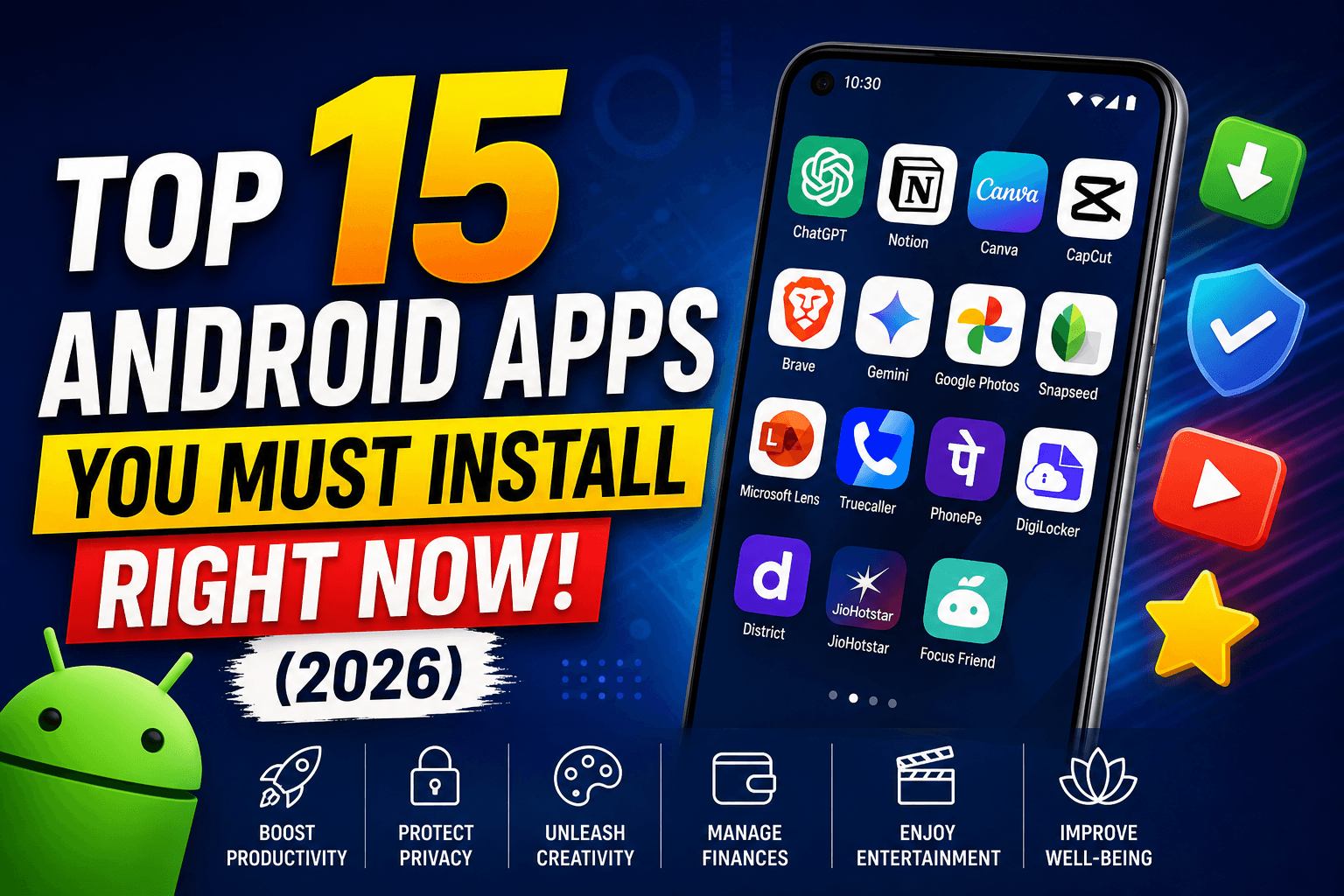
So, if you recently bought a new phone or simply want to refresh your app list, this guide covers the top 15 Android apps you must install right now in 2026.
This list is useful for students, creators, office workers, business owners, gamers, and everyday Android users in India and worldwide.
Why These Android Apps Are Worth Installing in 2026
The Play Store is full of apps, but not every app deserves space on your phone. For this list, we picked apps based on:
Real daily use
Clean user experience
Popularity and trust
Helpful features
India-friendly usefulness
Productivity and entertainment value
Google Play’s Best of 2025 also showed how India-focused apps are growing fast. For example, District: Movies Events Dining was named India’s Best App of 2025, showing how local discovery and lifestyle apps are becoming more important for Indian Android users. (blog.google)
1. ChatGPT – Best AI Assistant App
Category: AI / Productivity
Best For: Writing, learning, ideas, planning, coding help
ChatGPT is one of the most useful Android apps to install in 2026. Whether you are a student, blogger, developer, freelancer, or business owner, this app can save a lot of time.
You can use it to write emails, create captions, summarize long text, solve doubts, plan trips, generate ideas, and understand difficult topics in simple words.
Why Install ChatGPT?
Helps with study and work
Great for content ideas
Useful for coding and explanations
Can summarize long information quickly
Good for brainstorming business ideas
Best Use Case
If you are preparing for exams, creating YouTube scripts, writing blog posts, or managing clients, ChatGPT can act like a smart assistant in your pocket.
2. Notion – Best All-in-One Notes and Planner App
Category: Productivity
Best For: Notes, planning, projects, habit tracking
Notion is perfect for people who want one app for notes, tasks, goals, and planning. Instead of using separate apps for everything, Notion lets you create custom pages for study plans, content calendars, finance trackers, and personal goals.
It is especially useful for students, creators, remote workers, and small teams.
Key Features
Create notes and databases
Plan your daily schedule
Track habits and goals
Save links and research
Use ready-made templates
Why It Stands Out
Notion is flexible. You can keep it simple like a notes app or build a complete personal dashboard.
3. Canva – Best Design App for Everyone
Category: Design / Editing
Best For: Posters, thumbnails, resumes, social media posts
Canva is a must-have Android app in 2026 for creators, students, shop owners, and freelancers. You do not need professional design skills to make good-looking graphics.
From Instagram posts to YouTube thumbnails, resumes, business cards, invitations, and presentations, Canva makes design simple.
Key Features
Thousands of templates
Easy drag-and-drop editing
Logo, poster, and banner maker
Social media content tools
AI-powered design features
Best Use Case
If you run a small business, Instagram page, YouTube channel, or blog, Canva can help you create professional visuals in minutes.
4. CapCut – Best Video Editing App
Category: Video Editing
Best For: Reels, YouTube Shorts, vlogs, social media videos
CapCut is one of the most popular video editing apps for Android users. It is simple enough for beginners but powerful enough for content creators.
You can trim videos, add captions, use effects, apply filters, remove backgrounds, and create short-form videos quickly.
Key Features
Easy timeline editing
Auto captions
Trending effects and filters
Music and sound effects
Export videos in high quality
Why Install It?
In 2026, short videos are still one of the fastest ways to grow online. CapCut makes editing easier without needing a laptop.
5. Brave Browser – Best Privacy Browser
Category: Browser / Privacy
Best For: Fast browsing, ad blocking, privacy
Brave Browser is a strong alternative to Chrome if you care about speed and privacy. It blocks many ads and trackers by default, which can make websites load faster.
For Android users who browse news, blogs, shopping sites, and social media links daily, Brave is worth installing.
Key Features
Built-in ad blocker
Tracker protection
Private browsing
Fast page loading
Clean interface
Best Use Case
If you feel websites are slow or full of annoying ads, Brave gives a cleaner browsing experience.
6. Google Gemini – Best Google AI Companion
Category: AI / Assistant
Best For: Search help, writing, planning, Android integration
Google Gemini is another powerful AI app for Android users. Since it comes from Google, it works well with Android services and can help with search-style questions, writing, planning, and quick explanations.
It is useful when you want AI help directly connected to your Android experience.
Key Features
AI-powered answers
Writing and summary help
Good for quick research
Useful with Google ecosystem
Voice-friendly experience
Why It’s Useful
If you already use Gmail, Google Docs, Maps, and Search, Gemini can fit naturally into your daily workflow.
7. Google Photos – Best Photo Backup and Organizer
Category: Photos / Cloud Storage
Best For: Backups, photo search, memories
Google Photos is still one of the most important apps for Android users. It helps you back up photos, organize memories, search old pictures, and free up phone storage.
Its search feature is very useful. You can search by place, object, person, or date.
Key Features
Cloud photo backup
Smart search
Memory highlights
Basic editing tools
Easy sharing
Best Use Case
If your phone storage fills up quickly, Google Photos can help you manage your photo library better.
8. Snapseed – Best Free Photo Editing App
Category: Photo Editing
Best For: Simple and advanced photo edits
Snapseed is a free photo editing app from Google. It is great for users who want professional-looking edits without complex software.
You can improve brightness, contrast, sharpness, colors, portrait shots, and more.
Key Features
Professional editing tools
Selective adjustments
Filters and presets
Healing tool
No complicated interface
Why Install It?
For Instagram photos, product images, blog graphics, and personal edits, Snapseed is lightweight and powerful.
9. Microsoft Lens – Best Document Scanner App
Category: Scanner / Productivity
Best For: Scanning documents, notes, receipts, IDs
Microsoft Lens turns your Android phone into a portable scanner. It is very useful for students, office workers, and business owners.
You can scan notes, whiteboards, bills, forms, certificates, and documents. It can save scans as PDF, image, Word, or PowerPoint files.
Key Features
Scan documents clearly
Convert to PDF
Crop and clean images
Useful for handwritten notes
Works well for office and study use
Best Use Case
If you often need to submit documents online, Microsoft Lens is a must-install app.
10. Truecaller – Best Caller ID and Spam Protection App
Category: Communication / Safety
Best For: Spam call detection, caller ID
In India, spam calls are a daily problem. Truecaller helps identify unknown numbers, block spam calls, and manage caller information.
It is especially useful for people who receive calls from banks, delivery agents, clients, unknown numbers, or telemarketers.
Key Features
Caller ID
Spam call alerts
Call blocking
SMS filtering
Search unknown numbers
Honest Note
Truecaller is useful, but users should review privacy settings carefully and choose what data they want to share.
11. PhonePe – Best UPI and Payment App
Category: Finance / Payments
Best For: UPI payments, bill payments, recharges
PhonePe is one of the most widely used payment apps in India. It helps users send money, pay bills, recharge mobiles, book services, and manage UPI payments.
For Indian Android users, a reliable UPI app is almost essential.
Key Features
UPI money transfer
Mobile recharge
Electricity and utility bill payments
QR code payments
Bank balance check
Best Use Case
From paying at local shops to sending money to family, PhonePe is useful for everyday payments.
12. DigiLocker – Best Digital Documents App
Category: Government / Documents
Best For: Aadhaar, driving licence, certificates, official documents
DigiLocker is one of the most useful apps for Indian users. It lets you store and access digital versions of important documents.
You can keep documents like Aadhaar, driving licence, vehicle RC, marksheets, and certificates in one place.
Key Features
Access official documents digitally
Store important certificates
Useful for verification
Government-backed platform
Reduces need to carry physical copies
Why Install It?
If you live in India, DigiLocker can save time during travel, admissions, verification, and official work.
13. District – Best Local Discovery App in India
Category: Lifestyle / Events / Food
Best For: Movies, events, dining, local experiences
District by Zomato gained major attention after being named Google Play’s Best App of 2025 in India. It focuses on helping users discover movies, events, restaurants, and local experiences. (blog.google)
For users in urban India, this app can be useful for weekend plans, date nights, food discovery, and entertainment booking.
Key Features
Discover local events
Explore dining options
Find movie and entertainment experiences
Personalized recommendations
India-focused lifestyle discovery
Best Use Case
If you often ask, “What should I do this weekend?”, District is worth checking out.
14. JioHotstar – Best Entertainment Streaming App in India
Category: Entertainment / Streaming
Best For: Movies, shows, sports, live content
JioHotstar is one of India’s biggest streaming platforms. In 2025, it crossed 1 billion downloads on Google Play, showing its massive reach among Indian users. (The Economic Times)
It is popular for movies, TV shows, live sports, and regional content.
Key Features
Movies and web series
Sports streaming
Regional language content
Family entertainment
Large content library
Best Use Case
If you enjoy cricket, movies, Indian shows, or international entertainment, JioHotstar is a strong install.
15. Focus Friend – Best Digital Wellbeing App
Category: Focus / Wellness
Best For: Reducing distractions, staying mindful
Focus Friend became a standout app globally after being recognized as Google Play’s Best Overall App of 2025. It focuses on helping users stay present and reduce phone distractions. (Android Central)
In 2026, digital distraction is a real issue. Apps like Focus Friend can help students, workers, and creators stay away from endless scrolling.
Key Features
Helps improve focus
Encourages mindful phone use
Useful for study and work sessions
Simple wellness-focused experience
Good for screen-time control
Best Use Case
If you waste too much time on social media or keep checking your phone while studying, this app can help build better habits.
Quick Comparison: Top Android Apps to Install in 2026
App | Best For | Category |
|---|---|---|
ChatGPT | AI writing and learning | AI |
Notion | Notes and planning | Productivity |
Canva | Design and graphics | Design |
CapCut | Video editing | Video |
Brave Browser | Private browsing | Browser |
Google Gemini | AI assistant | AI |
Google Photos | Photo backup | Photos |
Snapseed | Photo editing | Editing |
Microsoft Lens | Document scanning | Productivity |
Truecaller | Spam call protection | Communication |
PhonePe | UPI payments | Finance |
DigiLocker | Digital documents | Government |
District | Events and dining | Lifestyle |
JioHotstar | Streaming | Entertainment |
Focus Friend | Focus and wellbeing | Wellness |
How to Choose the Best Android Apps for Your Phone
Before installing every app from this list, think about your daily needs.
If you are a student, start with ChatGPT, Notion, Microsoft Lens, DigiLocker, and Focus Friend.
If you are a creator, install Canva, CapCut, Snapseed, ChatGPT, and Google Photos.
If you want better daily convenience in India, PhonePe, Truecaller, DigiLocker, District, and JioHotstar are useful picks.
If you care about privacy and focus, Brave Browser and Focus Friend are great choices.
Pros and Cons of Installing Multiple Apps
Pros
Saves time in daily tasks
Makes your phone more useful
Helps with study, work, and entertainment
Improves creativity and productivity
Adds better security and convenience
Cons
Too many apps can slow older phones
Some apps need storage and background permissions
Notifications can become distracting
Premium features may require payment
Privacy settings should be checked carefully
Tips Before Installing Apps in 2026
Always download apps from trusted sources like Google Play Store or verified platforms. Check ratings, update history, permissions, and reviews before installing.
Avoid apps that ask for unnecessary permissions. For example, a calculator app should not need access to your contacts or microphone.
Also, uninstall apps you do not use. A clean phone is faster, safer, and easier to manage.
FAQs: Best Android Apps to Install in 2026
1. Which is the best Android app to install first in 2026?
If you want one app that helps in many areas, ChatGPT is a great first choice. It can help with writing, studying, planning, learning, and productivity.
2. Which apps are best for students?
Students should try ChatGPT, Notion, Microsoft Lens, Google Photos, DigiLocker, and Focus Friend. These apps help with notes, scanning, research, document storage, and focus.
3. Which Android apps are best for content creators?
Canva, CapCut, Snapseed, ChatGPT, and Google Photos are excellent for creators. They help with design, video editing, photo editing, ideas, and content organization.
4. Which apps are most useful for Indian Android users?
PhonePe, DigiLocker, Truecaller, District, and JioHotstar are very useful for Indian users because they solve daily needs like payments, documents, spam calls, entertainment, and local discovery.
5. Are these Android apps free?
Most apps on this list are free to download, but some offer premium plans or in-app purchases. You can start with the free version and upgrade only if you need extra features.
Final Verdict
The top 15 Android apps you must install right now in 2026 are the ones that make your phone smarter, faster, and more useful in real life.
For AI and productivity, install ChatGPT, Gemini, Notion, and Microsoft Lens.
For creativity, try Canva, CapCut, and Snapseed.
For daily Indian use, PhonePe, DigiLocker, Truecaller, District, and JioHotstar are worth checking out.
For privacy and focus, Brave Browser and Focus Friend are smart choices.
Install only the apps you actually need, keep permissions under control, and your Android phone will feel more powerful without becoming cluttered.